Find out why your site got hammered
Logloupe reads your web server’s access logs and shows you when the traffic spiked, who sent it, which bots were faking their names and what they were stuck on. Then it writes a block list that leaves the real search engines alone.
- Free and open source
- Runs on your computer
- Desktop app and command line
Example log: requests for /catalogue/ with page= appended again and again. Most come from addresses claiming to be Googlebot that are not in Google’s published list, so Logloupe marks them fake. A request from 66.249.66.1, which is in Google’s list, is marked verified.
See when it happened, and who sent it
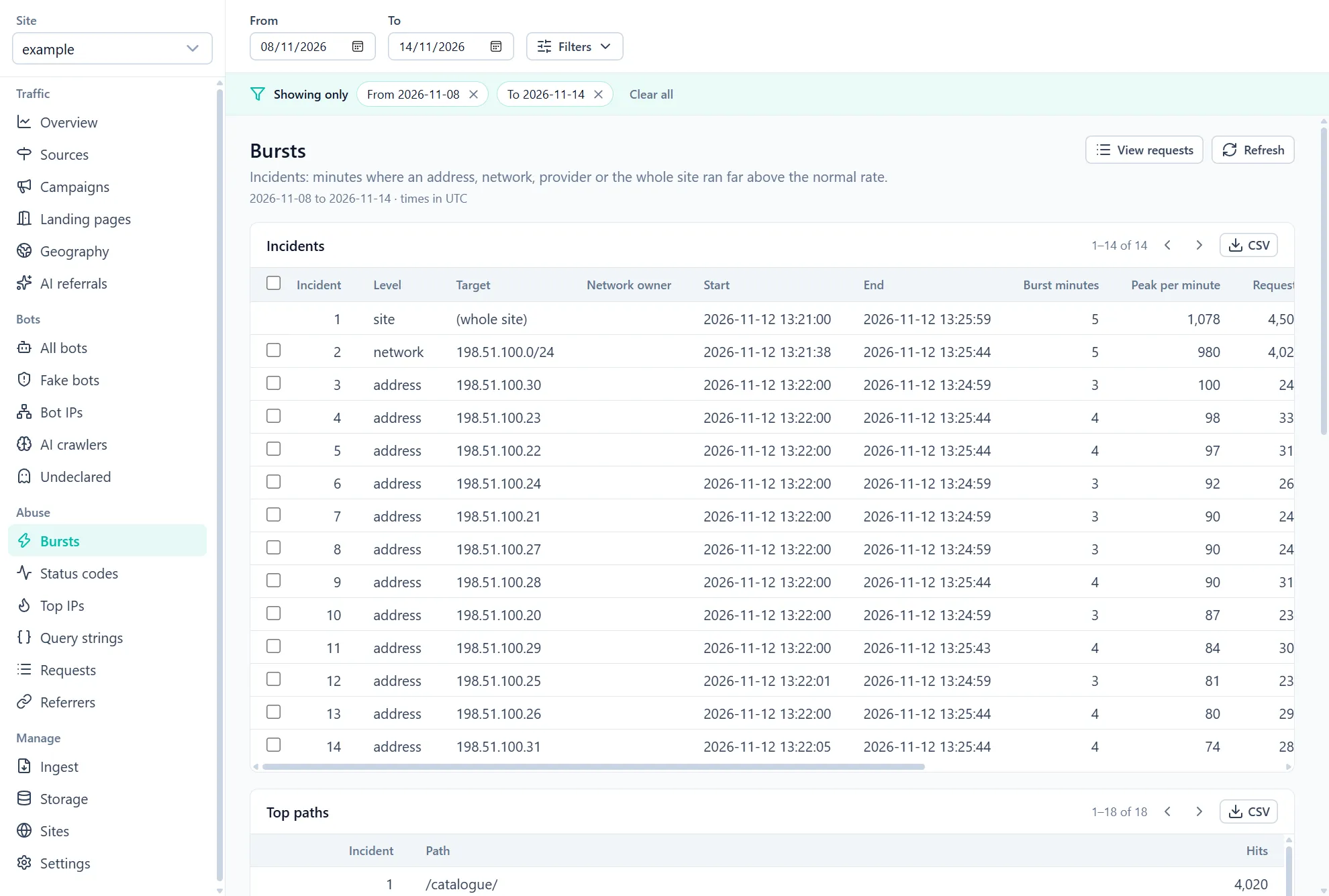
A list of top IP addresses tells you who was busy across the whole log. It doesn’t tell you what happened between 13:21 and 13:25. Logloupe finds the minutes when one address, one network, one hosting provider or the whole site ran far above its normal rate, and groups them into incidents with a start, an end, a peak and the paths that were hit.
From any incident you can open the individual requests behind it.
| Level | Target | Time | Minutes | Peak / min |
|---|---|---|---|---|
| Whole site | all traffic | 13:21:00–13:25:59 | 5 | 1,078 |
| └ Network | 198.51.100.0/24 | 13:21:38–13:25:44 | 5 | 980 |
| Address | 198.51.100.30 | within the burst | 3 | 100 |
| Address | 198.51.100.23 | within the burst | 4 | 98 |
| Address | 198.51.100.22 | within the burst | 4 | 97 |
| Address | 198.51.100.24 | within the burst | 3 | 92 |
| Address | 198.51.100.21 | within the burst | 3 | 90 |
| Address | 198.51.100.27 | within the burst | 3 | 90 |
| Address | 198.51.100.28 | within the burst | 4 | 90 |
| Address | 198.51.100.20 | within the burst | 3 | 87 |
| Address | 198.51.100.29 | within the burst | 4 | 84 |
| Address | 198.51.100.25 | within the burst | 3 | 81 |
| Address | 198.51.100.26 | within the burst | 4 | 80 |
| Address | 198.51.100.31 | within the burst | 4 | 74 |
Top path for the incident: /catalogue/, 4,020 requests. Incident figures from the app’s example log; the per-minute chart is an illustration. All traffic is invented.
Then find out what they were stuck on
Logloupe groups requests by the shape of their query string, and the cause often jumps out. Here it’s a pagination link that appends ?page= to itself, so every crawler that follows it finds an endless supply of “new” pages, and the server builds each one.
Response codes over time show the cost, with the URLs behind the errors. Fix the link and the loop goes away for everyone, polite bots included.
| Path | Query shape | Requests | Addresses | Errors |
|---|---|---|---|---|
| /products/ | page=…&sort=… | 16,836 | 2,361 | 710 |
| /catalogue/ | page=… | 1,022 | 12 | 411 |
| /catalogue/ | page=…?page=… | 995 | 12 | 408 |
| /catalogue/ | page=…?page=…?page=… | 983 | 12 | 362 |
| /catalogue/ | page=…?page=…?page=…?page=… | 1,020 | 12 | 393 |
The same 12 addresses keep requesting /catalogue/ with one more ?page= each time. A normal page with sorting, above, comes from thousands of addresses. Invented traffic.
Know which bots are real before you block anything
Anyone can write “Googlebot” in a user agent, and plenty of scrapers do. Block a fake one and nothing is lost. Block the real one and your pages start dropping out of search.
So Logloupe checks every claim against the IP ranges the operator publishes, and by forward-confirmed reverse DNS where they publish none, then marks the request verified, fake or unverifiable. A bot that can’t be checked either way is marked unverifiable, not guessed. Old logs are checked against the lists as they were at the time.
Checked today
Published IP ranges for Google (including its special-purpose and user-triggered crawlers), Bing, OpenAI, Anthropic, Perplexity, Apple and Common Crawl; announced network routes for Meta; forward-confirmed reverse DNS for Amazon, Yandex and Baidu. Reverse DNS is optional, because it sends addresses to your own DNS resolver.
| Bot | Kind | Requests | Share verified, fake and unverifiable | Verified | Fake | Unverifiable |
|---|---|---|---|---|---|---|
| GooglebotGoogle | search | 42,998 | 38,978 | 4,020 | 0 | |
| BingbotMicrosoft Bing | search | 32,734 | 32,734 | 0 | 0 | |
| GPTBotOpenAI | AI training | 28,088 | 26,651 | 1,437 | 0 | |
| OAI-SearchBotOpenAI | AI search | 5,889 | 5,889 | 0 | 0 | |
| ChatGPT-UserOpenAI | AI user fetch | 3,747 | 3,747 | 0 | 0 | |
| ClaudeBotAnthropic | AI training | 22,804 | 21,408 | 1,396 | 0 | |
| Claude-UserAnthropic | AI user fetch | 1,828 | 1,828 | 0 | 0 | |
| Meta-ExternalAgentMeta | AI training | 709 | 709 | 0 | 0 | |
| AmazonbotAmazon | AI training | 16,656 | 16,656 | 0 | 0 | |
| YandexBotYandex | search | 12,510 | 12,510 | 0 | 0 | |
| AhrefsBotAhrefs | SEO tool | 8,982 | 0 | 0 | 8,982 | |
| No crawlers visited this example log. When they visit yours, their requests are checked against the addresses publishes. | ||||||
An illustration with invented traffic, not a real site’s results. Amazonbot and YandexBot are shown as they appear when reverse DNS is switched on. Bots whose operators publish neither an IP list nor a reverse DNS domain, such as most SEO tools, are shown as unverifiable rather than guessed.
Then write a block list that leaves the real ones alone
Tick the addresses or networks and Logloupe writes them out as a plain list, nginx deny lines or Apache rules, ready to copy. Verified bots and your own server’s addresses are always left out.
It doesn’t apply anything. Busy is not the same as hostile, so you read the list and decide.
| Add to block list | Address | Claims to be | Requests |
|---|---|---|---|
| 203.0.113.8 | Googlebot Fake | 535 | |
| 203.0.113.4 | Googlebot Fake | 506 | |
| 203.0.113.5 | Googlebot Fake | 503 | |
| 203.0.113.2 | Googlebot Fake | 501 | |
| 203.0.113.3 | Googlebot Fake | 501 | |
| 203.0.113.1 | Googlebot Fake | 500 | |
| 198.51.100.23 | GPTBot Fake | 198 | |
| 198.51.100.30 | ClaudeBot Fake | 186 | |
| 66.249.66.1 | Googlebot Verified | never added |
5 entries. Read it before using it.
deny 203.0.113.2;
deny 203.0.113.3;
deny 203.0.113.4;
deny 203.0.113.5;
deny 203.0.113.8;
Including the AI crawlers
AI crawlers can fetch a lot of pages, and their names are popular to fake. Logloupe shows each operator’s crawlers separately (training, AI search, and fetches made when someone asks an assistant about your page), with the pages they fetched and how many of their requests were real.
Visits that arrive from ChatGPT and other assistants are counted too.
- OpenAIGPTBot, OAI-SearchBot, ChatGPT-User37,724 requests1,437 fakesusing its name
- AnthropicClaudeBot, Claude-User24,632 requests1,396 fakesusing its name
- AmazonAmazonbot16,656 requestsno fakesusing its name
- MetaMeta-ExternalAgent709 requestsno fakesusing its name
Logloupe also lists the pages each crawler fetched. Invented traffic from the app’s example log.
The rest of the log, too
- Busiest addresses and networks
- Top addresses, networks, hosting providers and countries, for the whole log or any time window.
- Every request behind every number
- Open the individual log lines behind any filtered view.
- Ordinary traffic
- Requests and pages over time, sources, UTM campaigns, landing pages and referrers, straight from the log.
- Command line
- The same engine as a command-line tool with JSON output, for servers and scripts.
- Large files
- Logs are read as a stream rather than loaded whole, so big files are fine.
How it works
- 1
Get your access log
Download it from your server. Logloupe reads the standard format nginx and Apache write by default, and more formats are coming.
- 2
Open it in Logloupe
Everything runs on your computer and nothing is uploaded. It fetches the bots’ published address lists and an optional location database when you ask, and reverse DNS checks, if you switch them on, go through your own resolver.
- 3
Find the cause
Start from the burst, follow it to the network, the paths and the bots, and copy a block list if you need one.
Coming soon
Logloupe is being tested now. It will be free and open source under the MIT licence: a desktop app for Windows first, with macOS and Linux to follow, plus the command-line tool.
Good to know
- It writes block lists but doesn’t block anything itself.
- A log records requests, not people, so it isn’t a replacement for analytics.
- Behind a caching CDN, the log only shows requests that reached your server.
- Location and network data is approximate.